
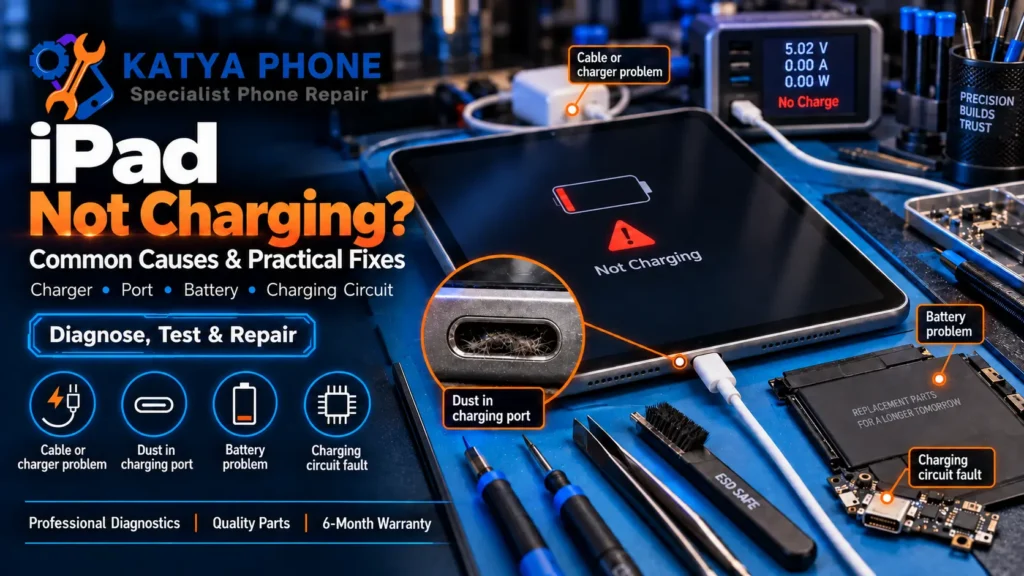
We regularly see iPads come in with the exact same pattern: plugged in for hours, and the battery percentage hasn’t moved at all. No cracked screen, no water exposure. It just stopped taking a charge. In a lot of cases it’s not the battery or the port at all.
If your iPad is not charging, the cause usually falls into one of three buckets: something software-side is holding the charge back, something in the cable, adapter or charging port is stopping the connection, or the battery has genuinely worn out. This guide walks through how to tell which one you’re dealing with, what to try first, and when it’s worth bringing it in for a tablet repair in Caroline Springs instead of guessing.
What’s Actually Stopping It From Charging?
Before assuming the worst, it helps to know what’s actually behind a “not charging” iPad. In 15 years of repairs, we’ve seen every one of these come through the door:
- A non-compatible cable or adapter. Charging requirements vary by model. A compatible 20W USB power adapter is a good test option for most recent iPads, while older models may charge normally, just more slowly, with lower-wattage adapters. A poor-quality or damaged cable can also deliver unstable power or none at all.
- A worn or damaged Lightning/USB-C cable. Internal wire breaks are common and often invisible from the outside.
- Dust, lint, or pocket debris packed into the charging port, breaking the physical connection.
- The iPad overheating and pausing charging on purpose to protect the battery.
- A temporary software glitch, or an 80% charging limit on supported newer iPad models.
- A battery that’s genuinely reached the end of its usable life after years of daily use.
The one most people don’t expect: we regularly see iPads come in for a “dead port” that turn out to be a poor-quality charger or a cable that’s failing intermittently. Always test with the original Apple cable, or a reputable, standards-compliant cable that’s compatible with your iPad, before assuming there’s a fault at all. For Lightning models, look for MFi certification.
Software Pause or Real Hardware Fault?
Signs it’s probably not hardware: the battery screen shows an 80% charging limit (on supported newer models), charging resumes fine after a force restart or on a different cable and adapter, or the iPad was noticeably warm from gaming or video before it stopped charging. We commonly see this exact scenario: someone convinced their iPad’s port is dead when it’s actually just overheated and pausing charging to protect the battery. It starts charging normally again once it’s cooled down.
Signs it’s likely a hardware issue: the charging icon doesn’t appear with any known-good cable or adapter, the port feels loose or the cable only makes contact at a certain angle, an “accessory not supported” message appears with a known-good cable, or Battery Health (on supported newer models) shows significant wear. Older iPads may not display Battery Health at all, so a slow, obvious decline in how long a charge lasts is the equivalent sign to watch for. If any of these match, no amount of resetting will fix it — it needs a proper look.
The Right Order to Try Things First
Step 1. Try the original Apple cable, or a reputable, compatible cable, with a 20W USB power adapter plugged directly into a wall outlet rather than a computer USB port.
Step 2. Check the port itself in good light for lint, dust, or bent pins. A soft puff of air can shift loose debris, but don’t go poking at it with anything metal or sharp, since it’s very easy to damage the internal contacts, and that turns a $0 fix into a paid one.
Step 3. Force restart the iPad using the correct button sequence for your model, then plug it back in and give it a few minutes before checking again.
Step 4. If the iPad feels warm, let it cool down fully before trying to charge it again; the pause is a safety feature, not a fault.
Step 5. Make sure iPadOS is fully updated, since battery management code gets patched fairly often.
If none of these work, get a free check before spending anything on a new charger or a guess-and-replace part.
What We Find at the Bench
The pattern we see most with iPads that “suddenly stopped charging” is a port that’s been quietly collecting lint and pocket debris for months, often from being carried loose in a bag alongside keys or coins, until one day the cable just stops making contact at all. By the time it reaches us, most customers mention the cable had been feeling a bit loose or fiddly for a while.
The other repeat offender is poor-quality chargers and cables. A reputable, compatible one costs more upfront, but an underpowered or failing cheap cable can leave an iPad stuck trickle-charging for weeks before it looks like a real fault. If the iPad still turns on and runs fine once it does get some charge, the cable, adapter and port are sensible places to start, though a battery or internal fault can’t be ruled out without an actual check.
Why We’d Steer You Away From the DIY Fix
It’s tempting to try a home fix after watching a video online, but a few things make this one riskier than it looks:
- Charging port construction varies between iPad models, and the port is often connected closely to other internal components. We don’t carry out board-level repairs ourselves; if a fault turns out to be board-level, we’ll always tell you your options rather than guess.
- Battery removal on iPads involves strong adhesive that, pulled wrong, can puncture or damage the battery cell.
- Parts availability and repair steps vary a lot by model. Apple does offer genuine parts for some eligible iPad models through its Self Service Repair program, but that’s aimed at people already experienced with detailed electronics repair, not a quick weekend fix.
- An unsuccessful DIY attempt can affect your options if it causes extra damage, so check your Apple warranty, AppleCare coverage, and Australian Consumer Law rights before opening an iPad that may still be covered.
The savings rarely outweigh the risk of turning a minor fix into a major one.
What Affects the Price
| Repair | Typical price range |
|---|---|
| iPad charging port diagnosis or repair – iPad mini / older models | $119–$179 |
| iPad charging port diagnosis or repair – iPad / iPad Air | $149–$219 |
| iPad charging port diagnosis or repair – iPad Pro | $179–$259 |
| Battery replacement – iPad mini / older models | $119–$189 |
| Battery replacement – iPad / iPad Air | $149–$249 |
| Battery replacement – iPad Pro | $229–$329 |
Prices are approximate ranges for iPad repairs in Caroline Springs / Melbourne’s west, Australia. Final cost depends on the device’s condition. Always request a free check before authorising any work.
Simple Ways to Avoid This Next Time
- Stick to the original Apple cable or a reputable, compatible one, with a 20W USB power adapter, since poor-quality chargers are one of the most common causes of “phantom” charging faults.
- Coil cables loosely, never sharply, right where they meet the connector, since that’s where internal wires break first.
- Clear pocket lint from bags before dropping your iPad in with it; it migrates into the port more than people expect.
- Avoid charging in direct summer sun through a car window. Melbourne’s west gets brutal cabin heat, and heat is hard on both the battery and the charging circuit.
- Keep iPadOS updated, and avoid leaving the battery fully drained for long stretches.
- Don’t yank the cable out at an angle. Unplug it straight to avoid stressing the port’s internal contacts.
Why Locals Choose Katya Phone for iPad Repairs
We’ve been fixing devices in Caroline Springs since 2012, with hands-on repair experience going back even further. Every iPad gets a free check first. We don’t quote blind, and we’ll tell you honestly if it’s a $0 software fix before we ever suggest opening the case.
We use high-quality replacement parts and explain the available part options before any repair begins. Every repair comes with a 6-month warranty. We regularly see customers from Burnside, Deer Park, Ravenhall, Taylors Hill, and St Albans as well as Caroline Springs itself.
Drop in or call — no appointment needed for a free check.
Related Articles
iPad Not Charging – Frequently Asked Questions
Why is my iPad not charging when plugged in?
What's the first thing I should check if my iPad won't charge?
How do I reset my iPad to try to fix a charging problem?
How can I tell if it's a faulty cable rather than the iPad itself?
What does it mean if my iPad only charges when plugged into a computer?
How much does it cost to fix an iPad that won't charge, and how long does it take?
Most “iPad not charging” cases come down to something simple: a non-certified cable or adapter, a bit of lint in the port, or the iPad overheating and pausing on purpose, not a dead battery or a damaged logic board. The trick is telling which one you’ve actually got before you spend a cent on a new charger or a guessed-at repair.
If you’ve been through the steps above and it’s still not charging properly, drop into our Caroline Springs tablet repair shop for a free check. No appointment needed, and we’ll tell you straight whether it’s the port, the battery, or something else entirely.