
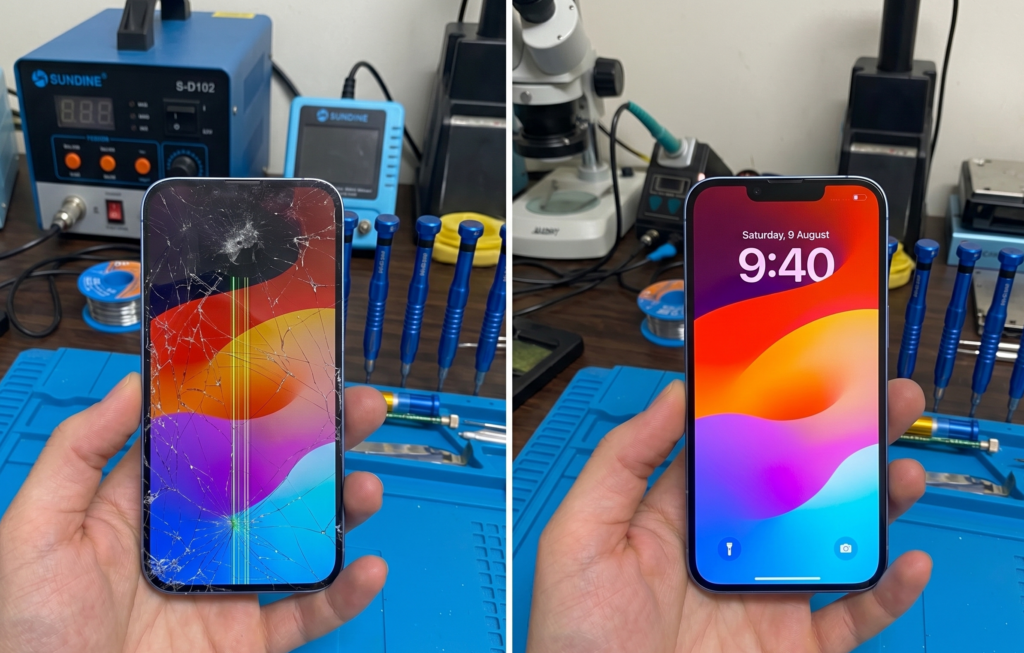
Dropping your iPhone 14 is a heart-stopping moment. You pick it up, turn it over, and there it is—a shattered screen. Whether it’s a tiny spiderweb crack in the corner or a completely black display that refuses to turn on, a damaged screen makes your premium device practically unusable.
Because we rely on our phones for everything from contactless payments to navigating Melbourne’s traffic, getting it fixed fast is a priority. At Katya Phone, we see this every day. Customers often walk in wondering if they just need a quick glass fix or a complete iPhone 14 screen replacement.
In this guide, we will walk you through the signs of a failing display, what the repair process looks like, and what you need to know before booking your repair in Caroline Springs.
Signs You Need an iPhone 14 Screen Replacement
Sometimes the damage is obvious, but other times, the internal OLED display can fail even if the top glass looks perfectly fine. Here is how to tell if it’s time for a replacement:
- Shattered Top Glass: The most common issue. Even if the screen still responds to your touch, sharp glass shards are dangerous, and cracks let dust and moisture straight into the motherboard.
- Unresponsive Touch (Digitizer Failure): You try to swipe, but nothing happens. Or worse, the phone suffers from “ghost touch,” opening apps and dialing numbers all on its own.
- Black Spots or Ink Bleeds: If you see purple, green, or black patches spreading across your screen, the internal OLED panel has ruptured. This cannot be reversed and requires a full display replacement.
- Green or White Lines: Vertical lines running down the screen usually indicate damage to the display flex cables, often caused by a hard drop or pressure.
- A Completely Black Screen: The phone still rings and vibrates, but the display remains completely dark.
Glass-Only vs. Full Display Repair
When you book an iPhone 14 screen replacement, the type of repair depends on the extent of the damage:
- Glass-Only Repair: If your screen is cracked but the touch works perfectly and there are no black spots or lines, the OLED panel underneath is still healthy. This is generally a more affordable fix.
- Full OLED Assembly Replacement: If the touch is failing, the screen is flickering, or there are dead pixels, the entire display assembly (glass + digitizer + OLED panel) must be replaced.
Unsure which one you need? A quick diagnostic check at Katya Phone will confirm it.
What Happens During the Repair Process?
At Katya Phone, we don’t just swap screens; we follow a strict procedure to ensure your phone functions exactly as it did before the drop.
1) Pre-Repair Diagnostic Testing
Before opening the device, we test the cameras, microphones, Face ID, and sensors to ensure no other internal components were damaged during the drop.
2) Safe Removal
The iPhone 14 opens from the front (unlike the back-glass entry of the iPhone 15). We use controlled heat to soften the factory adhesive, carefully lifting the damaged screen without tearing the delicate Face ID and earpiece flex cables.
3) Installation and Sealing
We clean the frame of all old adhesive and apply a fresh water-resistant seal before connecting the new display assembly and pressing it firmly into place. After installation, a final test is performed to ensure perfect touch response and display clarity.
Will My iPhone 14 Still Be Water-Resistant?
This is a very common and important question. iPhones are manufactured with specific seals and pressure testing. After any repair where the device is opened, water resistance can never be guaranteed the same way as factory conditions. While we use premium sealing methods and proper adhesives to restore the best possible protection against dust and minor splashes, we highly recommend keeping your repaired iPhone away from swimming pools, steam, and heavy rain.
DIY Repair vs. Professional Screen Replacement
You might be tempted to buy a cheap screen online and try it yourself. Here is a quick look at why professional repair is usually the safer bet:
| Feature | DIY Home Repair | Katya Phone Professional Repair |
| Parts Quality | Often low-quality aftermarket LCDs | Premium replacement panels |
| Face ID Risk | High risk of tearing the Face ID cable | Safely handled by experts |
| Turnaround Time | Hours of stressful work | Usually completed same-day |
| Warranty | None (if you break it, you pay twice) | Covered by repair warranty |
What to Do Before Dropping Off Your Phone
To make your visit as smooth as possible:
- Back up your data: Save your photos and contacts to iCloud or a computer, just in case.
- Know your passcode: We need to test the screen’s touch functionality after the repair.
- Don’t put tape on it: Unless glass is actively falling out and cutting you, avoid using thick tape, as it makes the removal process harder.
Related Articles:
» iPhone 15 Back Glass Replacement: Cost, Process & Best Solution
» iPhone Repair Service in Burnside
» Top Benefits of Professional Cracked Screen Repair
» Mobile Phone Repair: Fix Screen and Battery
» iPhone Repair Service in Ardeer
» Smartphone Charging Port Repair in Caroline Springs
» Smartphone Power Button Repair in Caroline Springs
FAQs: iPhone 14 Screen Replacement
Most screen replacements at Katya Phone are completed on the same day, often within an hour, assuming there is no severe frame damage.
No, a screen replacement does not delete your data. However, we always recommend backing up your phone beforehand as a general safety practice.
Yes. The Face ID components are attached to the screen but are separate from the display itself. Our technicians carefully transfer your original Face ID sensors to the new screen.
Glitching or flickering is a clear sign that the OLED panel beneath the glass was damaged upon impact, or the internal display cable has come loose.
Absolutely. The iPhone 14 is a powerful, modern device. Replacing the screen is significantly cheaper than buying a brand-new phone, and it restores its full resale value.
Indirectly, yes. Open cracks allow dust and moisture into the phone, which can eventually reach the battery and motherboard, causing severe short circuits.
