
You plug in your device before bed, expecting to wake up to a 100% battery, but instead, the screen stays dark. A dead battery is stressful, but a device that refuses to take a charge is even worse. If you are frantically searching for how to fix phone not charging, you are in the right place.
Before you assume your phone is completely dead and needs to be replaced, know that charging issues are incredibly common and often very easy to fix. In this comprehensive guide, Katya Phone breaks down the top reasons why your device won’t charge, the safe troubleshooting steps you can try at home, and when it’s time to hand it over to a professional technician.
Common Reasons Why Your Phone Isn’t Charging
Before jumping into the fixes, it helps to understand what might be causing the problem. Charging systems rely on a chain of connections, and if one link fails, the whole process stops.
- Dirt and Pocket Lint: The most common culprit. Every time you slide your phone into your pocket, lint gets pushed into the charging port. Over time, it compacts and blocks the charging cable from making a connection.
- A Damaged Cable or Adapter: Cables bend, fray, and break internally. A faulty wall adapter can also stop delivering power.
- A Broken Charging Port: If you constantly yank the cable out or use your phone while it’s plugged in, the internal pins inside the port can bend or snap.
- Software Glitches: Sometimes the hardware is fine, but the phone’s software has frozen and isn’t recognizing the power input.
- A Degraded Battery: Batteries have a limited lifespan. If your battery is old or damaged, it simply may not be able to hold a charge anymore.
How to Fix Phone Not Charging: 4 Things to Try at Home
If you want to know how to fix phone not charging issues quickly, start with these safe, DIY troubleshooting steps:
1) Check Your Cable and Power Adapter
Always start with the easiest solution. Try plugging your cable into a different wall adapter, or try charging your phone through a computer USB port. If you have a spare cable, test that as well. You’d be surprised how often the issue is just a faulty $10 cable rather than a broken phone.
2) Clean the Charging Port (Carefully!)
If the cable feels loose or doesn’t “click” into place, you likely have lint buildup.
- Do: Use a wooden or plastic toothpick to gently scoop out visible debris.
- Don’t: Never use a metal needle, paperclip, or safety pin. Metal can scratch the delicate connection pins or cause a short circuit, permanently ruining the port.
- Important Warning: Do not attempt to use liquid cleaners, alcohol, or compressed air if you don’t know the proper techniques, as this can push moisture into the motherboard and cause severe liquid damage. If you are unsure or uncomfortable doing this yourself, don’t risk it! Bring your device to Katya Phone, and we will safely and professionally clean the port for you with the right microscopic tools.
3) Perform a Hard Reset
If your phone is totally unresponsive, a software crash might be preventing it from charging. Performing a “hard reset” forces the phone to restart its systems.
- For iPhone: Press and quickly release Volume Up, then Volume Down, then press and hold the Power button until the Apple logo appears.
- For Android: Hold down the Power button and Volume Down button simultaneously for about 10-15 seconds until the screen reboots.
4) Try a Wireless Charger
If your phone supports wireless charging (MagSafe or Qi), place it on a charging pad. If the phone starts charging wirelessly but refuses to charge via the cable, you have successfully isolated the problem: your charging port is broken and needs professional replacement.
When to Seek Professional Phone Repair
If you have tried the steps above and are still wondering how to fix phone not charging, it is time to bring it to a professional. Trying to force a charger into a broken port or using extreme heat to “dry” a wet port will only cause permanent motherboard damage.
At Katya Phone, we handle charging issues every day. Our process includes:
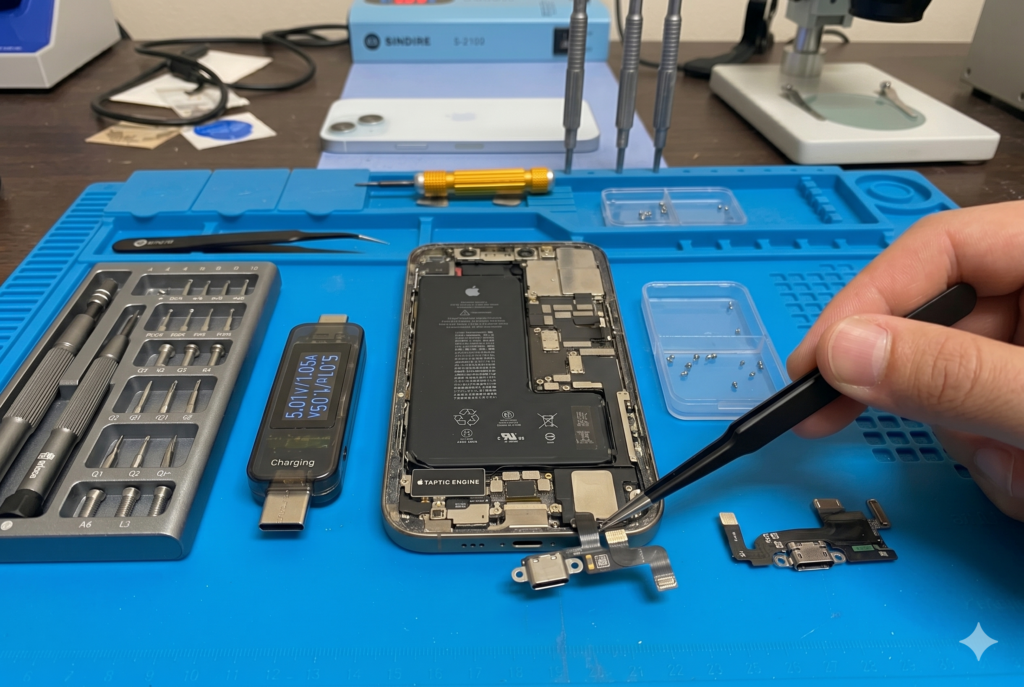
- Micro-Soldering and Port Replacement: We safely remove broken charging ports and solder new, high-quality replacements directly to the board.
- Battery Diagnostics: We test your battery’s cycle count and voltage to see if a simple battery replacement will solve the issue.
- Water Damage Assessment: If moisture caused a short in the charging IC (Integrated Circuit), we clean and repair the damaged components on the motherboard.
How Long Does a Charging Port Repair Take?
Most charging port replacements and battery swaps can be completed on the same day within 1 to 2 hours. We keep parts for major brands in stock to ensure you aren’t left disconnected for long.
Related Articles:
» iPhone Repair Service in Caroline Springs
» Smartphone Button Repair in Caroline Springs.
» iPhone Repair Service in Sunshine
» iPhone 15 Back Glass Replacement: Cost, Process & Best Solution
FAQs: Phone Charging Issues
This is often caused by a weak power adapter, a faulty charging cable, or a severely degraded battery that is consuming power faster than it receives it.
No! Never spray liquids directly into your phone port. If cleaning is required, professionals use high-purity isopropyl alcohol and specialized brushes.
Absolutely. A charging port repair is significantly cheaper than buying a new phone, and it instantly restores your device to full working order.
Many modern phones have sensors in the port. If it detects water, it disables charging to prevent a short circuit. Let the phone dry naturally in a well-ventilated area for a few hours before trying again.