
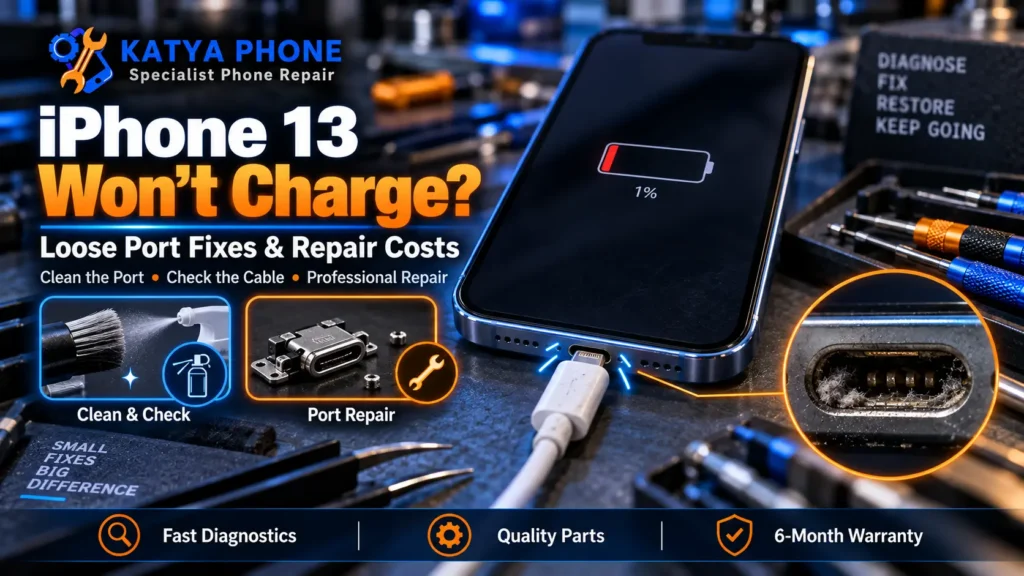
If your iPhone 13 has started charging only when you wiggle the cable, or the plug feels like it barely grips anymore, you’re not imagining it. The iPhone 13 charging port is one we see loose fairly often at our Caroline Springs bench, and here’s the part most people don’t realise: a loose port isn’t always wear and tear. Sometimes it’s simply lint, sometimes a worn cable, and occasionally a connector that never fitted well from new, which changes what your best next step is.
So before you pay for anything, the goal is to work out which of three things you’re dealing with: a dirty port, a worn cable, or a real hardware fault. Most of the time it’s one of the first two, and those cost you little or nothing. This guide shows you how to tell them apart, what a safe clean looks like, and when an iPhone 13 charging port repair is the honest answer.
Port, Cable, or Just Dirt? How to Tell
Start here, because the fix is completely different for each. A quick way to narrow it down: try a second known-good cable and a different wall plug first. If a fresh cable charges fine, your old cable was the problem, not the phone.
Then shine a bright light into the port. A surprising amount of “loose port” trouble on an iPhone 13 is compacted lint from living in a pocket. If the plug now clicks in firmly after a clean, you’ve saved yourself a repair. If it still wobbles or only charges at an angle with a good cable in a clean port, the port hardware itself is likely at fault.
One more clue that points toward the port: if your iPhone 13 charges wirelessly but won’t take a cable, the physical Lightning port or its internal connection is more likely to be involved than the battery.
What Makes an iPhone 13 Port Go Loose or Stop Charging
There isn’t one single cause, which is why guessing wastes money. These are the ones we come across most on the 13 series:
- Lint and pocket debris. The most common by far. Compacted fluff at the back of the port stops the cable seating fully, so it feels loose and charges intermittently.
- A worn or fraying cable. Bent pins or a loose plug on the cable mimic a broken port exactly. Always rule this out first.
- A port that was loose from new. In rare cases, a phone may have had a poor-fitting connector from the beginning. If your iPhone 13 felt loose soon after purchase and has no signs of drop or liquid damage, it’s worth checking your warranty before paying.
- Everyday wear on the connector. Thousands of plug-in cycles slowly loosen the port’s grip, especially if you charge in the car with a stiff cable.
- Drop damage to the flex cable. A knock can crack the port’s flex cable even with no visible damage outside.
- Moisture and corrosion. Rain, a spill, or a humid pocket can corrode the tiny contacts inside and interrupt charging.
In 15 years of repairs, the one that catches people out most is the cable. They’re certain the port is broken, when a fresh cable would have sorted it in seconds. It’s always the cheapest thing to rule out first.
A Safe Way to Clean the Port Yourself
If the phone wasn’t dropped or wet, a careful clean is worth trying before you spend anything. Do it gently, in this order.
- Step 1 – Power the phone off. Never poke around a live port.
- Step 2 – Inspect with a torch. Look for a grey plug of lint packed at the very back. That back corner is usually the culprit.
- Step 3 – Use a wooden or plastic toothpick. Very gently loosen and lift the lint out. A clean, dry, soft-bristled toothbrush also works well for looser dust.
- Step 4 – Test the fit. Plug a good cable back in. If it now clicks in firmly and charges, you’re done.
One thing not to do: never use a metal pin or needle inside the port. Metal can short the contacts or bend the central tongue. Avoid forcing compressed air directly into the port, as it may push debris further inside. And if you see a liquid-detection warning, do not insert the cable until the port and cable are completely dry.
If it’s still loose after a clean and a fresh cable, bring it in for a free check before spending anything. We’ll confirm whether it’s the port, the cable, or something deeper without charging you for a look.
Check Your Warranty Before You Pay
If your port felt loose early in the phone’s life and it was never dropped or exposed to liquid, it may fall under Apple’s warranty or under Australian Consumer Law, which applies on top of any manufacturer warranty. A charging port that fails without abuse can reasonably be a covered fault, so it’s worth checking your coverage before authorising a paid repair.
If your iPhone 13 is out of warranty, was dropped, or has liquid damage, that coverage won’t apply, and a straightforward port repair is usually the sensible, low-cost route back to normal charging.
What a Charging Port Repair Actually Involves
On an iPhone 13, the Lightning port is part of a flex cable assembly along the bottom edge. When cleaning doesn’t fix a loose or dead port, that assembly is replaced. It’s a delicate job because the flex runs to the logic board and battery connections, which is why it’s best left to someone who does it regularly.
Port cleaning is usually quick, often 15 to 45 minutes. A full port replacement takes longer, usually one to three hours depending on workload and parts. We test charging properly before handing the phone back, to confirm that charging is stable.
Whether you’re in Caroline Springs, Deer Park, Burnside or out towards Melton, the approach is the same: we look first, tell you if a clean will do, and only quote a replacement if it’s genuinely needed.
Why DIY Port Replacement Is Risky
Cleaning a port at home is fine. Replacing one yourself is where it usually goes wrong:
- The port flex is tiny and connects deep inside; a slip can damage the battery or logic-board connectors nearby.
- Cheap aftermarket flex cables often charge slowly or fail within weeks.
- Reassembling the iPhone 13 without resealing it properly removes what water resistance it had left.
- A wrong move on the flex can turn a $60 part into a phone that won’t power on at all.
The savings rarely outweigh the risk of turning a simple port fix into a board repair.
What a Repair Costs
Cost depends on whether your iPhone 13 needs a clean or a full port replacement. As a guide for an iPhone 13 charging port repair in Caroline Springs and Melbourne’s west:
| Service | Approx. price (AUD) |
|---|---|
| Charging port clean (lint / debris) | From $29 |
| iPhone 13 charging port replacement | From $89, quoted after inspection |
| Free check to confirm port vs cable vs board | $0 |
Prices are approximate ranges for the iPhone 13 in Caroline Springs / Melbourne’s west, Australia. Final cost depends on the device’s condition and part quality. Always request a free check before authorising any work.
How to Keep It From Happening Again
- Blow lint out of your pocket-carried phone’s port every few weeks with a gentle clean, before it compacts at the back.
- Retire frayed cables early. A worn cable wears the port faster and mimics a broken one.
- Charge on a stable surface rather than yanking the cable sideways in the car, which loosens the port over time.
- Consider a MagSafe or wireless charger for daily top-ups to cut wear on the Lightning port entirely.
- Use a case that partly shields the port opening if you carry the phone loose in a bag.
- Dry the port fully before charging if the phone has been out in Melbourne rain.
Why Choose Katya Phone for Your iPhone 13
We’ve spent 15 years fixing phones in Melbourne’s west, and loose iPhone 13 ports are a repair we handle most weeks. We take a look first with a free check, tell you honestly whether a clean will sort it or the port needs replacing, and quote before we start.
We fit quality parts, test charging before return, and back our repairs with warranty. We’re local to Caroline Springs and serve Burnside, Deer Park, Ravenhall, St Albans, Taylors Lakes and out towards Melton. Drop in or call, no appointment needed.
Related Articles
More repair guides from our bench that pair well with this one:
iPhone 13 Charging Port - Frequently Asked Questions
How do I know if it's the port or the cable?
Try a second known-good cable and a different wall plug. If a fresh cable charges fine, the old cable was the problem. If a good cable still wobbles or only charges at an angle in a clean port, the port hardware is the likely fault.
My iPhone 13 port feels loose. Is it damaged?
Not necessarily. Loose feel is most often compacted lint stopping the cable seating fully. Clean it gently first. If a good cable still doesn’t grip after cleaning, the port itself may be worn or faulty.
How do I clean my iPhone 13 charging port safely?
Power the phone off, look inside with a torch, and gently lift out lint with a wooden or plastic toothpick or a soft-bristled toothbrush. Never use metal tools, and avoid forcing compressed air into the port. If you see a liquid-detection warning, don’t insert a cable until the port is fully dry.
Could my iPhone 13 port have been loose from new?
In rare cases a phone can have a poor-fitting connector from new. If your iPhone 13 felt loose soon after purchase and was never dropped or exposed to liquid, it’s worth checking your Apple warranty or Australian Consumer Law coverage before paying for a repair.
How much does an iPhone 13 charging port repair cost?
A clean starts from about $29. A full port replacement starts from around $89 and is quoted after inspection, depending on condition and part quality. We give you a free quote after confirming whether it’s the port, the cable, or something deeper.
How long does a charging port repair take?
Port cleaning is usually 15 to 45 minutes. A full port replacement typically takes one to three hours depending on workload and parts availability.
My phone charges wirelessly but not with a cable. What's wrong?
That points toward the physical Lightning port or its internal connection rather than the battery. Wireless charging bypasses the port, so it working while the cable doesn’t suggests the connector, flex, or contacts need a closer look.
Will I lose my data during a port repair?
No. A charging port repair is a hardware fix and doesn’t touch your storage, so your photos, apps and messages stay put. A backup before any repair is still good practice.
Can I keep using the phone with a loose port?
You can, but a loose port often gets worse and can stop charging entirely at a bad moment. It’s better to clean or check it early, especially if it might still be under warranty.
Do you repair iPhones outside Caroline Springs?
Yes. We’re in Caroline Springs and regularly help customers from Burnside, Deer Park, Ravenhall, St Albans, Taylors Lakes and out towards Melton. Walk in or call for a free check.
iPhone 13 charging only when you wiggle the cable? Bring it into Katya Phone in Caroline Springs for a free check. We’ll tell you honestly whether a clean will fix it or the port needs replacing, and quote before any work starts. Call 0451 041 090 or walk in, no appointment needed.
Pingback: iPhone 17 Charging Port Repair: Why It Won't Charge
Pingback: iPhone 13 Battery Replacement Cost Australia 2026 | Katya Phone