
If you are searching for a reliable iPhone water damage repair solution, you know that every second counts. It happens in slow motion—your phone slips from your hand and—splash—it’s submerged in the sink, the pool, or worse, the toilet. That sinking feeling in your stomach is universal. We rely on our smartphones for everything, and seeing one take an unplanned swim is stressful.
However, liquid damage doesn’t always mean a dead device. If you act quickly and follow the professional steps for iPhone water damage repair, there is a very high chance of recovery. As experts at Katya Phone, we’ve seen it all. This guide will walk you through exactly what happens when a phone gets wet and the professional-approved steps to bring it back to life.
Why Water is the Enemy of Electronics
To fix the problem, you first need to understand it. It’s a common myth that the water itself “short-circuits” the phone instantly. While that can happen, the real villain is corrosion.
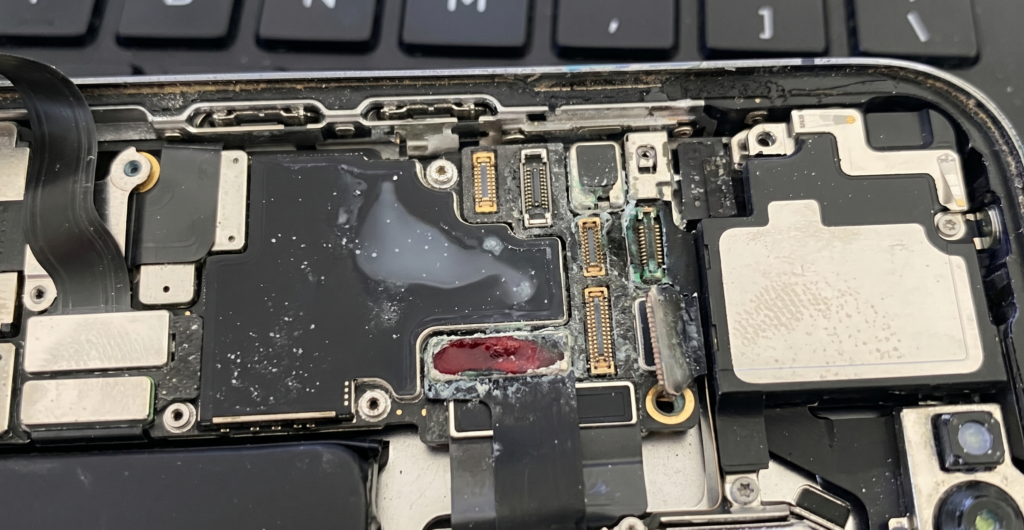
Most water contains minerals and impurities. When water enters your phone and meets the battery’s electrical current, it triggers a chemical reaction. This creates a crusty residue on the delicate logic board and connectors, eating away at the metal traces. Even if your phone works immediately after getting wet, lingering moisture can cause it to fail days or weeks later as corrosion spreads.
Common Causes of Water Damage
While “dropping it in the pool” is the classic scenario, moisture can find its way into your device in several ways:
- Submersion: Dropping the phone in baths, sinks, toilets, or oceans.
- Spills: Knocking over a glass of water, coffee, or soda onto the screen.
- Humidity and Steam: Leaving your phone in the bathroom during a hot, steamy shower.
- Heavy Rain: Using your device during a downpour without protection.
- Exercise: Excessive sweat seeping into ports during a workout.
Signs Your Phone Has Water Damage
Sometimes you don’t see the splash, but the symptoms are clear. Look out for:
- Foggy Camera Lenses: Visible moisture or droplets inside the front or rear camera glass.
- Distorted Audio: Speakers sounding muffled, crackly, or not working at all.
- Charging Issues: The phone refuses to charge or gives a “Liquid Detected” warning.
- Screen Glitches: Lines across the display, dark spots, or an unresponsive touch screen.
- Rapid Battery Drain: The device getting unusually hot or losing power quickly.
Step-by-Step Solutions: The First Aid Guide
Phase 1: Immediate Damage Control
- Retrieve it immediately: The longer it stays submerged, the more liquid enters the internal seals.
- Power it OFF: If it’s still on, turn it off right away. This stops the electrical flow and prevents a short circuit.
- Remove the Essentials: Take off the case, remove the SIM card tray, and if you have an older model with a removable battery, take it out.
- Wipe it down: Use a lint-free microfiber cloth to dry the exterior thoroughly.
Phase 2: What NOT to Do (The “Rice Myth”)
Pro Tip: Never put your phone in a bowl of rice. Rice is ineffective at pulling moisture out of sealed electronics and often introduces fine dust and starch into the charging port, making the situation worse.
- No Hairdryers: High heat can melt the adhesive holding your screen in place and damage sensitive components.
- No Shaking: Shaking the phone can actually push water deeper into the internal crevices.
- Do Not Charge: Never plug a wet phone into a charger. This is the fastest way to fry the motherboard.
Phase 3: The Advanced “Air Dry” Method
Instead of rice, place your phone in a well-ventilated area. If you have silica gel packets (the little “do not eat” bags found in shoeboxes), place the phone in a sealed container with several of those. They are much more efficient at absorbing moisture than food grains. Leave the device for at least 24 to 48 hours.
When to See a Professional Technician
If your phone doesn’t power on after 48 hours of drying, or if you noticed it was submerged in salt water or soda, you need professional help. Sugary and salty liquids are significantly more corrosive than tap water.
A professional technician will perform an ultrasonic cleaning. This involves disassembling the phone and placing the logic board in a special machine that uses high-frequency sound waves and a chemical solution to “blast” away corrosion that a cloth can’t reach.
How Much Does it Cost?
One of the most frequent questions we hear is: “What is the average iPhone water damage repair cost?” Generally, a professional cleaning and diagnostic fee can range from $100 to $150. However, if the water has permanently damaged the screen or the battery, the total cost could rise to 250$-350$ depending on your model. Comparing this to the price of a brand-new $1,000+ smartphone, a professional repair is almost always the smarter financial move.
Tips to Prevent Future Water Damage
Prevention is always cheaper than a cure. Here is how to keep your tech dry:
- Invest in a Waterproof Case: If you spend time near the water or work outdoors, brands like LifeProof or Catalyst offer total immersion protection.
- Use Dry Bags: When going to the beach or boating, keep your phone in a floating waterproof pouch.
- Avoid “Bathroom Browsing”: Keep your phone out of the bathroom to avoid steam damage.
- Be Mindful of “Water Resistance”: Remember that water-resistant is not waterproof. As a phone ages, the internal seals degrade. A phone that was “IP68 rated” two years ago may no longer be able to withstand a splash today.
Conclusion
Water damage is a race against time. By powering the device off immediately and avoiding the “rice trap,” you give your phone the best chance of survival. However, because internal corrosion is an invisible enemy, the safest bet is always to have a professional technician open the device and ensure it is 100% dry and clean.
Is your phone acting up after a splash? Don’t wait for the corrosion to set in. Bring your device to Katya Phone Repair today for a professional diagnostic and liquid damage cleaning. We’ll help you get back to scrolling in no time!
Related Articles:
» iPhone Repair Service in Caroline Springs
» Samsung Smartphone Repair Service in Caroline Springs
» iPhone Repair Service in Brooklyn
» iPhone Repair Service in Derrimut
» Smartphone Power Button Repair in Caroline Springs
» Smartphone Case Repair in Caroline Springs
» Smartphone Water Damage Repair Service in Caroline Springs
Frequently Asked Questions (FAQ)
As technicians, we often see IP68-rated phones with severe internal corrosion because the protective rubber gaskets degrade naturally after 6-12 months of use.
You can try using a vacuum to gently pull moisture from the ports, but be careful not to hold it too close, as static electricity from the vacuum can occasionally damage electronics.
We recommend a minimum of 48 hours. Turning it on too early is the number one cause of permanent motherboard failure.
Pingback: Can You Use an iPhone With a Cracked Screen? (2026)