
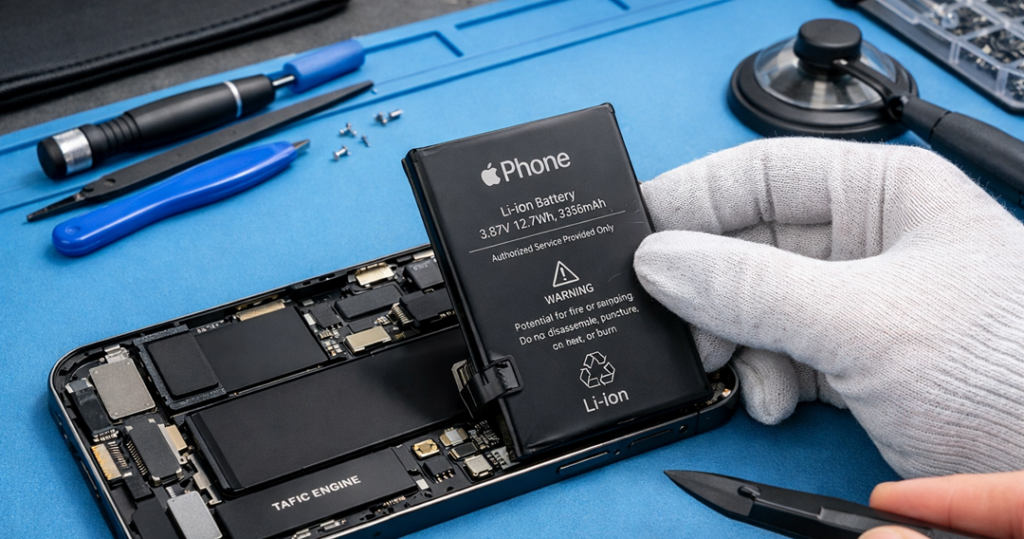
Your iPhone 15 is supposed to feel smooth and reliable all day. Still, one day you notice something small… like the battery dropping quicker than normal. Then, after a week or two, it becomes a daily headache. In fact, many people keep thinking it’s a “software bug” or “charger issue,” but often the real reason is simple: the battery is wearing out.
At Katya Phone, we see this every week. Someone walks in saying, “Bro, my iPhone was perfect last month,” and now it dies at 18% or heats up while just using WhatsApp. So, if you’re searching for iPhone 15 battery replacement signs, this article will help you decide clearly, without guessing.
Why iPhone 15 battery problems start (even if you take care)
Batteries don’t last forever. The iPhone 15’s battery is a lithium-ion battery that gradually loses capacity as you put charge cycles on it. That’s normal. But heat, fast charging, gaming, heavy reliance on camera and a lot of overnight charging can also speed it up — nearly daily.
Also, there is some background activity that gets increased with a certain update or an app. So yes, sometimes it’s software. However, if you keep getting the same problem over and over, it’s probably the battery itself. Get details on Mobile Repair in Caroline Springs.
1) Battery drains faster than before (the most common sign)
This is the first thing most people notice. You charge to 100%, you go out, and suddenly it’s at 70% with not much use. Of course, if you’re using maps, camera, and mobile data, drain is expected. But if it’s barely doing anything and it still plummets like a stone, that is an issue.
Typical patterns:
- 100% to 80% in a short time
- 40% to 20% very quickly
- battery drops even while idle
A sudden decline like that is usually a sign of a worn-out battery.
2) iPhone 15 shuts down even when it shows 20% or 30%
If your phone is powering down and it still has charge, that’s a strong warning. Typically the battery is insufficiently powerful when you need a lot of power all at once, such as to:
- opening camera
- taking video
- gaming
- using GPS
- switching apps fast
So the phone protects itself and shuts down. It’s annoying, and honestly it can be risky if you’re outside and need the phone.
3) The phone feels slower, laggy, or “not smooth”
This is a sneaky one. People don’t always connect slowness with battery. But when the battery’s performance weakens the phone may slow down to help avert those sorts of sudden shutdowns. As a result, you might see:
- apps opening slower
- keyboard delay
- random stutters
- camera taking time to load
Yes, storage can cause lag too. However, if slow performance comes together with fast drain, the battery becomes the top suspect.
4) Overheating during normal use
Phones get warm sometimes, sure. But if your iPhone 15 gets hot while doing basic stuff like browsing, chatting, or music, something is not right.
Usually:
- Normal heat: gaming, long video call, heavy camera use
- Not normal: warm/hot during simple scrolling or even standby
Heat also damages the battery faster, so it becomes a cycle. That’s why it’s better to fix it early.
5) Charging becomes weird: slow, stuck, or jumping
Not all charging problems are from the cable. Sometimes the battery itself is struggling. You may notice:
- charging stuck at certain % (like 80–85)
- very slow charging from 80 to 100
- battery jumps up after restart
- battery jumps down suddenly
Try a different cable and adapter first, of course. Still, if the issue stays the same, it can be an iPhone 15 battery replacement situation. Looking for a iPhone Repair in Caroline Springs?
6) Battery Health in Settings looks low (and you feel it daily)
You can check this on your phone:
Settings → Battery → Battery Health & Charging
Look at:
- Maximum Capacity
- Peak Performance Capability messages
If the phone shows a warning about performance, don’t ignore it. That’s the system telling you the battery is not giving steady power anymore.
Some people ask, “What percentage means replace?” It depends. Because if your phone still lasts all day, you can wait. But if you’re struggling daily, replacement makes sense even if the number isn’t super low.
7) Low Power Mode becomes your daily habit
Low Power Mode is good for travel days. Still, if you are always turning it ON just to survive until evening, that’s basically a sign your battery can’t keep up with normal life.
8) Battery drains overnight even when you don’t touch it
If you sleep with 60% and wake up with 35%, that’s not great. First, check Battery usage inside Settings. Sometimes one app is draining in the background.
But if you already:
- updated apps
- restarted the phone
- reduced background refresh
…and still the overnight drain continues, then yes, battery aging can be involved.
9) Battery percentage becomes “untrustable”
This is when the phone shows 18%, then suddenly it’s 7%. Or it stays at 1% for a long time, then dies. That is often a sign of battery wear and unstable voltage delivery.
When the percentage becomes unreliable, your phone becomes stressful to use. So replacement is worth it.
10) Swollen battery or screen lifting (urgent warning)
This is rare, but serious. If you see:
- the screen lifting slightly
- gaps near the edges
- phone rocking on a table
Stop using it. Don’t press it down. Get it checked quickly. A swollen battery is not something to “wait and see.” Get details on Mobile Screen Replacement in Caroline Springs.
Before you replace: quick checks you can do at home
Before you book a replacement, try these simple steps:
- Restart your iPhone 15
- Update iOS and apps
- Check Battery Usage (Settings → Battery)
- Reduce background activity
- Test another cable/adapter
- Clean charging port gently (no sharp tools)
If the problem persists after both, then replacing your battery is the better choice.
What you can expect after an iPhone 15 battery replacement
A proper iPhone 15 battery replacement should improve:
- daily screen time
- stable percentage readings
- smoother performance (in many cases)
- less random shutdown
- better charging behaviour
So yes, you should feel a clear difference. It’s not magic, but it’s a big relief.
Related Articles:
» iPhone 16 Pro screen flickering fix: Causes & Repair options
» iPhone 16 battery draining fast: diagnosis + battery replacement
» Galaxy A55 Water Damage Repair: What to Do First?
» OPPO Speaker Not Working: Water and Dust
» Galaxy A56 Battery Replacement: How long it takes?
Tips to make your new battery last longer
After replacement, do these habits (not perfect, but helpful):
- don’t leave phone in heat (car dashboards are killer)
- avoid letting it hit 0% daily
- don’t use cheap chargers
- close heavy apps when not needed
- keep apps updated
You don’t need to baby the phone, honestly. Just avoid heat and extreme usage patterns.
FAQ: iPhone 15 Battery Replacement
1) What are the main iPhone 15 battery replacement signs?
Fast drain, random shutdown, overheating, low battery health, and percentage jumping are the big ones.
2) Is fast battery drain always battery fault?
Not always. Sometimes an app or update causes it. But if it continues for weeks, the battery is likely worn.
3) Why does my iPhone 15 die at 20%?
Most often, that’s because the battery is unable to deliver a stable amount of power under load so the phone shuts itself off to prevent damage.
4) Can a weak battery make the iPhone 15 slow?
Yes. The phone may reduce performance to prevent sudden shutdowns.
5) My phone heats up while charging, is that normal?
Small warmth is normal. But if it gets hot often, or charges weirdly, it may be a battery issue.
6) Will battery replacement fix percentage jumping?
In most cases, yes. A new battery provides more consistent readings.
7) Should I replace the battery if Battery Health is low but phone works?
If it still lasts fine, you can wait. However, if daily use is annoying, replace it.
8) Can charging cables cause battery problems?
Bad cables can cause charging issues, yes. So test a known good cable first.
9) Is it safe to use the iPhone 15 if the screen is lifting?
No. Screen lifting can mean battery swelling. Stop using it and get it checked.
10) Can I just use Low Power Mode daily instead of replacing it?
You can, but it’s not a long-term solution. It’s not going to address the root cause.
11) Will the new battery improve camera performance?
If the phone was slowing down due to battery weakness, yes it can feel better.
12) How long does an iPhone 15 battery replacement take?
It depends on testing and device condition. Proper service includes checks, not only swapping.