
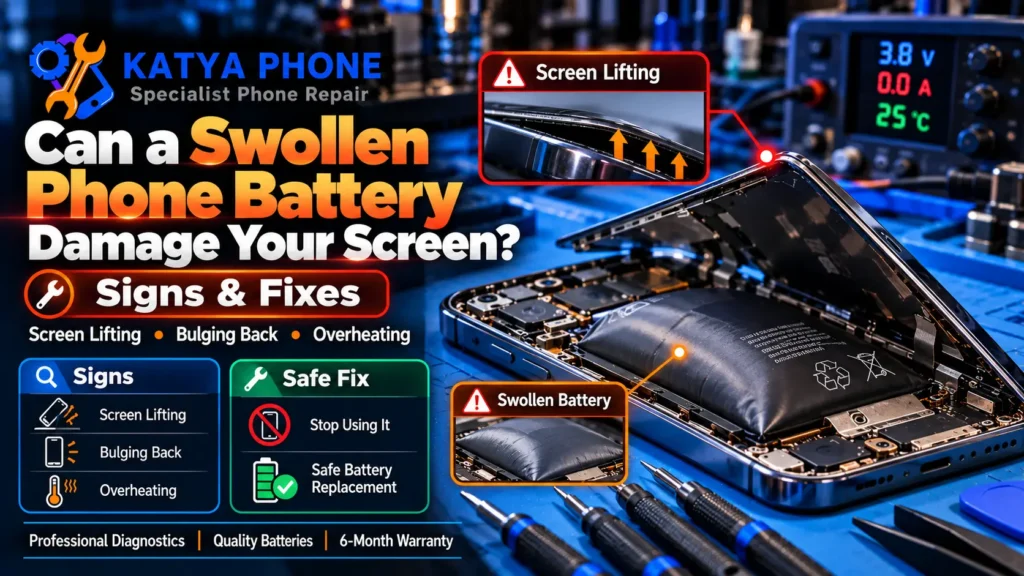
If the back of your phone has started to bulge, the screen is lifting at one edge, or the whole case feels like it’s being pushed apart, stop and read this before you do anything else. A swollen phone battery is not a cosmetic quirk that will settle down on its own. It’s a lithium-ion cell filling with gas, and once it reaches that point it can push your screen out of the frame, warp the chassis, and in the worst cases overheat or catch fire. We see swollen batteries on the bench at our Caroline Springs shop most weeks, often in older iPhones and Android phones that have been left on a charger overnight for years.
The good news: caught early and handled properly, it’s usually a straightforward fix. This guide walks you through why batteries swell, whether a swollen battery can really damage your screen, what to do in the next ten minutes, and when it’s time to bring it in for a professional battery replacement. No scare tactics, just what actually happens and what to do about it.
Why Does a Phone Battery Swell in the First Place?
A phone battery swells when gas builds up inside the sealed lithium-ion cell. That gas is a sign the chemistry inside has started to break down, and once it starts it doesn’t reverse. Here’s what usually triggers it:
- Age and charge cycles. Batteries lose capacity as they age and rack up charge cycles. After several years of regular use, internal degradation becomes far more common, though the exact point varies with the device, charging habits, and temperature.
- Heat. This is the big one in Melbourne’s west. A phone left on the dash or in a hot car over summer cooks the cell. Heat is the single fastest way to age and swell a battery.
- Cheap chargers and cables. No-name chargers with poor voltage regulation stress the cell far more than a quality charger. We pull swollen batteries from phones that have only ever seen a $5 servo cable.
- Long spells at a high charge, plus heat. Long periods sitting at a very high state of charge, especially combined with heat, can speed up battery ageing over time. Modern phones include charging-management features to ease this, but keeping the phone cool matters most.
- Physical damage. A hard drop can damage the internal separator, and a punctured or crushed cell can swell soon after even if the phone still turns on.
- A manufacturing fault. Occasionally a battery is simply defective from the factory and swells early, with none of the causes above.
In 15 years of repairs, the cause that surprises people most is heat, not age. We regularly open near-new phones with puffed batteries where the only thing that went wrong was a summer spent living in a hot car.
Can a Swollen Phone Battery Actually Damage the Screen?
Yes. A swollen battery can crack or lift your screen, and it’s one of the most common ways swelling causes real damage. As the cell fills with gas it expands, and inside a tightly packed phone there’s almost nowhere for that pressure to go. So it pushes against the largest flat surface it can reach, which is usually the display or the back glass.
That’s why so many people first notice a swollen battery when their screen starts lifting away from the frame, a gap opens along one edge, or touch response goes strange in one area. Left long enough, the pressure can crack the panel outright, separate the adhesive, bend the frame, or press on internal parts. A phone screen lifting because of a swollen battery should never simply be pressed back into place, and you should never clamp it or hold it shut with rubber bands. That traps a gassing cell under pressure, which is exactly the wrong thing to do.
What to Do Right Now If Your Battery Is Swollen
If you can see or feel a swollen phone battery, treat the phone as a fire-safety issue, not a repair job you’ll get to later. Here’s the safe order to handle it:
- Stop charging it immediately. Charging adds heat and stress to an already failing cell. Unplug it and don’t plug it back in.
- Power it off if you can do so without pressing on the swollen area. If the screen is unresponsive or the swelling is under the buttons, just leave it as is.
- Move it somewhere safe. Put it on a hard, non-flammable surface, away from sunlight, heat, paper, bedding, and other flammable things. Not in your pocket, not in a bag.
- Don’t press, bend, puncture, or freeze it. Puncturing a lithium cell can cause it to catch fire. Freezing it does nothing useful and can crack the casing.
- Back up your data if the phone still turns on safely. Copy your photos and important files while you can, because you’ll want the battery out soon.
- Get it to a repair shop for safe removal and replacement. If none of your own steps feel safe, that’s your cue to bring it in rather than keep handling it.
If the phone is hot to touch, smells sweet or chemical, or is visibly leaking, don’t try to move it far. Keep people away from it and treat it as an active fire risk. If you see smoke, hear hissing or popping, notice the phone heating up fast, or the battery looks like it’s venting gas, get away from the device and call emergency services if there’s any immediate fire risk.
Is It Safe to Keep Using a Phone With a Slightly Swollen Battery?
No. Even a slightly swollen phone battery is unsafe to keep using, and the risk only grows the longer you leave it. A phone can stay cool and keep working for weeks with a swollen cell, which fools a lot of people into thinking it’s fine. It isn’t. The swelling means the internal chemistry has already failed, and every charge cycle adds heat and pressure to a cell that’s meant to be sealed and stable.
Plenty of customers tell us they’ve been using a puffy phone for months. Some get away with it; some come in after the screen has popped out or the phone has started getting alarmingly hot on charge. It’s not worth the gamble on a device that lives in your pocket and charges next to your bed.
Signs You Need a Professional to Look at It
Some battery worries turn out to be nothing. Real swelling is not one of them. Bring it in when you notice any of these:
- The back cover or screen is bulging, lifting, or has a visible gap along an edge.
- The phone rocks or wobbles when laid flat on a table because the back is no longer flat.
- Buttons that used to click are now stiff or raised because something is pushing them from inside.
- The phone gets hot on charge, drops from full to dead quickly, or shuts off with charge left.
- You can smell a sweet, metallic, or solvent-like odour from the phone.
Any one of these is enough. You don’t need to wait for all of them.
Not sure whether what you’re seeing is swelling or just a loose case? Bring it into our Caroline Springs shop and we’ll take a look and give you a free, honest quote before anything is touched.
How a Swollen Battery Gets Replaced (and What It Costs)
Replacing a swollen battery is a routine repair for us, but it needs care. The swollen cell is glued in, and prying against a gassing battery is exactly what you don’t want to do, so we remove it slowly with the right adhesive solvents and tools rather than forcing it. Once the old cell is out and the phone is checked over, a quality replacement goes in, and we test charging performance before you leave.
Most phone battery replacements at Katya Phone are completed the same day when we have your model’s part in stock, and many take under an hour and a half at the bench. Here’s a realistic guide to what you’ll pay:
| Service | Typical price (AUD) |
|---|---|
| Phone battery replacement (most iPhone & Android models, incl. installation) | $69 – $219 |
| Screen repair, if the swelling has already cracked or lifted the display | From $99, depending on model & panel type |
| Free check & quote before any work | $0 |
Prices are approximate ranges for phones in Caroline Springs / Melbourne’s west, Australia. Final cost depends on your model, part availability, and the device’s condition. Always request a free check before authorising any work.
One honest note: if the swelling has already pushed the screen out and warped the frame, a battery replacement alone may not put a bent display fully back. Sometimes the screen goes back down flat after the new battery, sometimes prolonged pressure has weakened the adhesive or bent the frame and the display needs replacing too. We’ll tell you which it is before you commit to anything.
How to Safely Dispose of a Swollen Battery in Australia
Never put a swollen phone battery in your household rubbish or kerbside recycling. Damaged lithium-ion batteries are a real fire hazard in collection trucks and sorting facilities, and they’re one of the leading causes of waste-facility fires. A swollen or badly damaged battery also shouldn’t go into a normal B-cycle drop-off bin, which is meant for undamaged batteries. Instead, contact your local council, transfer station, or an appropriate battery recycler and ask how they want damaged lithium-ion batteries handled. The simplest option is to let a repair shop replace it, and dispose of the old cell the right way, so you don’t have to handle it at all.
Simple Ways to Avoid a Swollen Battery Next Time
You can’t make a battery last forever, but you can stop most swelling before it starts:
- Keep your phone out of hot cars. In a Melbourne summer this is the single most important habit. A dashboard in the sun is the fastest way to kill a battery.
- Use a quality charger and cable. A decent branded charger costs a little more and treats the cell far more gently than a cheap no-name one.
- Don’t keep it pinned at 100% in a warm spot. Modern phones manage overnight charging well, so the bigger issue is heat. Avoid charging under a pillow or in a hot room, and let the phone cool while it charges.
- Plan to replace the battery around the two-to-three-year mark if it’s fading, rather than pushing an old cell until it swells.
- Take drops seriously. If your phone takes a hard hit and the battery behaviour changes afterward, get it checked rather than waiting for a bulge.
- Act on early warning signs. Fast draining, heat on charge, and shutdowns with charge left are the battery telling you it’s near the end.
Why Choose Katya Phone in Caroline Springs
We’ve been repairing phones in Caroline Springs since 2012, with hands-on repair experience going back to 2009. A swollen phone battery is a repair we handle carefully and often, for customers across Caroline Springs, Deer Park, St Albans, Taylors Lakes, Sydenham and the wider western suburbs.
We look first and quote before we touch anything, so you know the cost up front. We use genuine or high-quality replacement parts depending on your model and explain the options honestly, and we back our work with a 6-month warranty. We’re not Apple Authorised, and we’ll always be upfront about that. If a repair isn’t worth the money on an older phone, we’ll tell you that too.
Drop in or call us for a free check, no appointment needed. If your battery is swelling, sooner is safer than later.
Related Articles
More from our repair bench that might help:
Swollen Phone Battery – Frequently Asked Questions
Can a swollen phone battery damage my screen?
Yes. As the battery fills with gas it expands and pushes on the largest surface it can reach, usually the display or back glass, so the screen can lift, crack, or separate from the frame. Never press a lifted screen back down onto a phone with a swollen battery.
Is it safe to keep using a phone with a swollen battery?
No. Even slight swelling means the cell has already failed internally. It can stay cool for weeks and then overheat, leak, or catch fire. Stop charging it and have the battery replaced.
What should I do right now if my battery is swollen?
Unplug it, power it off if you can without pressing the swollen area, and place it on a hard, non-flammable surface away from heat. Don’t puncture, bend, or freeze it, then bring it in for safe removal and replacement.
What causes a phone battery to swell?
Age and charge cycles, heat (a hot car is the worst culprit in Melbourne), cheap chargers, constant overnight charging at 100%, physical drops, or occasionally a factory fault.
How much does it cost to replace a swollen phone battery?
Most phone battery replacements run $69 to $219 AUD including installation, depending on your model. If the swelling has cracked the screen, screen repair starts from $99. We always give a free quote first.
Will my screen go back to normal after the battery is replaced?
Sometimes. If the frame and adhesive aren’t damaged, the screen often sits back flat with a new battery. If prolonged pressure has bent the frame, the display may need replacing too. We check and tell you before starting.
How do I dispose of a swollen battery in Australia?
Never in your household bin. Use a B-cycle battery collection point or your council’s e-waste drop-off. If we replace the battery for you, we dispose of the old cell the right way.
Can a swollen battery be fixed, or does it have to be replaced?
A swollen cell can’t be repaired or safely deflated. The only safe fix is to remove it and fit a new battery.
How long does a swollen battery replacement take?
Many are done the same day when your model’s part is in stock, often in under 90 minutes at the bench.
Do you replace swollen batteries for iPhone and Android?
Yes. We replace swollen batteries in iPhone, Samsung, Pixel, OPPO, Xiaomi and many other models, for customers across Caroline Springs and Melbourne’s west.
A swollen phone battery is one of the few phone faults that’s genuinely worth acting on the same day. It won’t settle down on its own, it can lift or crack your screen, and it’s a real fire risk sitting in your pocket or charging by your bed. The fix is usually simple when it’s caught early, but it needs to be handled with care rather than forced.
If you’ve spotted a bulge, a lifting screen, or a phone that won’t sit flat, bring it into Katya Phone in Caroline Springs for a free check and an honest quote before anything is touched. Drop in or call us on 0451 041 090 — no appointment needed.