
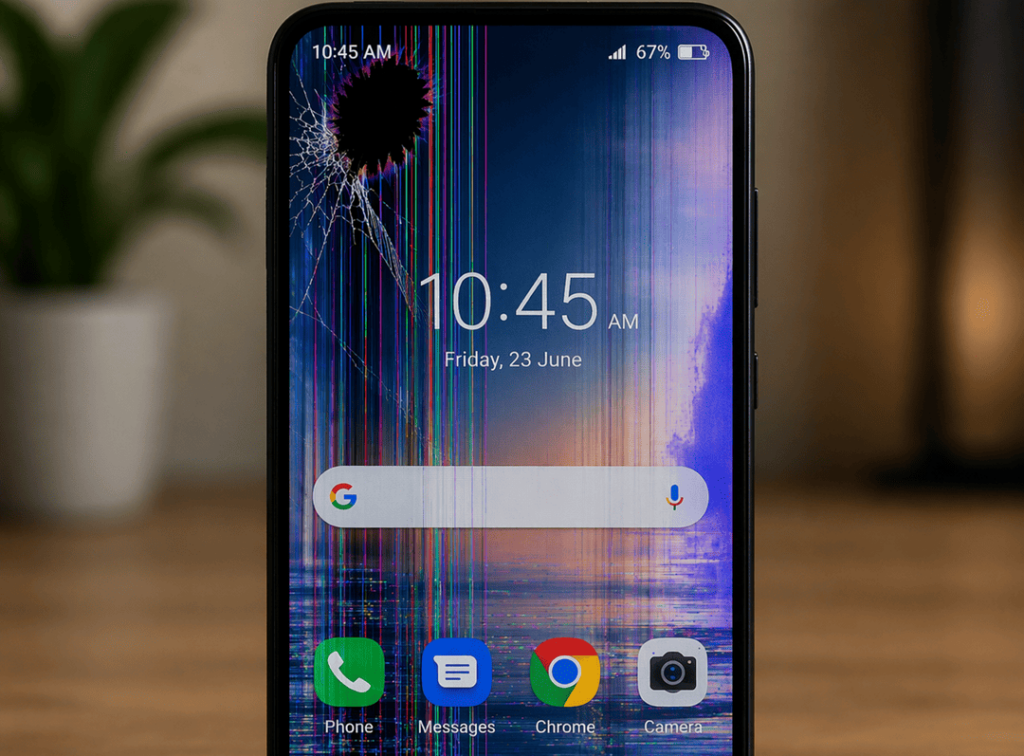
Having a damaged phone screen makes even a simple text reply part of an everyday headache. One minute, your device seems to be working just fine, and the next you’re dealing with cracks, screen flickering or dead spots, ghost touches or an ill-fated display that suddenly goes black. Because most of us use our phones for work, banking, directions, photo taking and social chatting, even a small hiccup with the screen can seem like a massive problem.
As the team at Katya Phone is based in Melbourne’s western suburbs, we regularly see customers walk in asking: “Is this just a small screen issue, or am I looking to do a full phone screen repair?” The answer depends on the type of damage, how soon you can act, and whether it’s only a glass issue or a problem with the entire display underneath. So from what most phone screen problems are to causes, and the best solutions for fixing them let’s delve into it.
Why phone screens fail more often than people expect
Modern smartphones are slick — and so are their screens. Most devices have the front assembly as a single unit made of glass and touch-sensitive digitiser with display. So when your phone plunges to the floor, finds itself crunched up in a pocket, overheats or runs into moisture, one or more of those layers can fail.
Also, not every screen issue begins with a sharp decline. Sometimes the issue builds slowly. A small crack stretches over the time. Screen flicker is caused by a loose connector. Swollen batteries push against the display. And because of that, acting early can prevent a pricier repair down the road. Get details on Mobile Repair in Caroline Springs
Common phone screen problems and what they mean
1. Cracked phone screen
A cracked phone screen is the most obvious issue. In some cases, only the top glass breaks while the display still works normally. However, in other cases, the crack affects touch performance, image quality, and even the phone’s structural safety.
Common signs:
- Visible lines or shattered glass
- Sharp edges around the screen
- Touch working in some places but not others
- Spreading cracks after small pressure
A cracked screen should never be ignored for too long. Dust and moisture can slip through damaged areas, and that may lead to deeper internal faults.
2. Flickering screen
A flickering phone screen may flash, pulse, dim, or change brightness on its own. Sometimes it happens after a drop. Other times it appears due to software bugs, loose display connectors, or a failing screen panel.
Common causes include:
- Display cable damage
- Faulty screen assembly
- Water exposure
- App conflicts or software glitches
- Overheating
If a restart fixes it briefly but the problem returns, the phone likely needs a professional inspection. Looking for a Mobile Screen Replacement in Caroline Springs?
3. Dead pixels or black spots
Black spots, colored dots or bizarre patches of colour on the display usually indicate internal display damage. Because the glass may appear intact doesn’t mean that the LCD or OLED panel underneath isn’t already failing.
These problems tend to compound over time. So prompt repair is often the quickest option.
4. Ghost touch
Ghost touch is when your phone behaves as if someone is touching the screen, even though nobody touches it. It can open apps, type gibberish or render the device practically unusable.
This problem may result from:
- Screen damage
- Moisture intrusion
- Charging issues with low-quality cables
- Internal hardware faults
- Poor-quality previous repairs
5. Unresponsive touch screen
An unresponsive display may be limited to one corner or the whole thing. While some of these are software-related, many have to do with digitiser damage that occurs after impact.
If the phone powers on but registers no touches or swipes, unlocks it can even be frequently necessary to replace the damaged screen. Get details on Smartphone Charging Port Repair in Caroline Springs.
Quick comparison of common screen issues
| Problem | What You May Notice | Possible Cause | Typical Fix |
| Cracked screen | Broken glass, visible lines | Drop or pressure damage | Screen repair or replacement |
| Screen flickering | Flashing, dimming, unstable brightness | Loose connector, panel fault, software issue | Diagnosis, reconnect, update, or replace |
| Black spots | Ink-like patches or dead areas | Internal display damage | Screen replacement |
| Ghost touch | Random tapping or scrolling | Screen fault, moisture, charging issue | Diagnostic check and repair |
| Touch not working | Delayed or no response | Digitiser damage | Screen replacement |
| Blank display | Phone on, but screen black | Display failure or board issue | Testing and repair |
Can you fix a phone screen at home?
Many people look for DIY videos before making a repair booking. Rebooting a phone, upgrading the software, or peeling away a screen protector that has gone wrong might fix very minor issues but most genuine screen faults require specialist tools and replacement parts.
Here is a simple guide:
| Issue Type | Safe to Try at Home? | Needs a Technician? |
| Minor software glitch | Yes | Not always |
| Temporary flicker after update | Yes | If it continues |
| Cracked glass | No | Yes |
| Black display with sound still working | No | Yes |
| Ghost touch | Sometimes basic checks only | Yes |
| Water-related display issue | No | Yes, urgently |
DIY repair kits may look cheap at first. However, they often lead to poor fitting, weak touch response, damaged seals, or a completely dead display. As a result, the final repair can cost more.
What to do as soon as you notice a screen problem
Back up your data
If the phone still works, save your photos, notes, contacts, and documents straight away. A failing screen can worsen without warning.
Stop pressing on cracked areas
Many users keep tapping harder when the touch starts failing. Unfortunately, that often spreads the damage.
Remove cheap chargers and accessories
A poor charger or cable can sometimes contribute to ghost touch or flickering issues.
Keep the phone dry and cool
Heat and moisture make screen problems worse. Therefore, avoid leaving the device in a hot car or damp bathroom.
Book a professional inspection
A proper technician can tell whether you need a glass-only fix, a full display replacement, or further internal repair. Looking for a Smartphone Battery Replacement in Caroline Springs?
When a repair is better than replacement
Not every damaged phone needs to be replaced. In fact, many screen issues can be solved quickly and affordably with a professional mobile phone screen repair. That is especially true when the motherboard, battery, and camera are still in good condition.
Repair is often the smarter choice when:
- The phone still performs well overall
- The damage is limited to the display
- You want to keep your data and apps
- A new handset would cost far more
- You need a faster solution
For many customers, a same-day screen replacement service is far more practical than buying a brand-new phone.
Why professional screen repair matters
Fixing a screen so it lights up again is only half the story of a quality repair. It is also about touch response, display brightness and clarity, frame precision, adhesive quality and longevity. So, setting to work with an experienced repair shop is important.
At Katya Phone, customers typically look for three things: honest guidance, a fast turnaround and a screen that feels right once it’s repaired. It sounds reasonable, as a low-quality screen can end up with washed-out colours, stuttery scrolling or flakey touch response.
A proper technician will:
- Test the phone before and after repair
- Check for hidden internal damage
- Use quality replacement parts
- Confirm touch, brightness, and sensor function
- Make sure the phone is safe to use again
Related Articles:
» iPhone Repair Service in Caroline Springs
» Samsung Smartphone Repair in Caroline Springs
» OPPO Smartphone Repair in Caroline Springs
» Xiaomi Smartphone Repair in Caroline Springs
» Google Pixel Phone Repair in Caroline Springs
Solving Phone Screen Problems the Smart Way
The vast majority of phone screen problems are unlikely to repair themselves. A tiny crack can spread. A display that flickers can be a total dud. The blackness can expand until half the screen is unreadable. Thus the best course is to tackle the problem early.
Whether it be a cracked mobile phone screen, its flickering, ghost touch or the display going dead, let’s look at what you can do to fix this issue depending on what is causing the problem. And, in many instances, rapid professional assistance can salvage your phone, your data and your budget. Getting your device checked sooner rather than later is the right call in case it shows any of these warning signs.
FAQs: Phone Screen Problems
1. What causes a phone screen to flicker?
Software bugs, loose internal connectors, impact damage, moisture or a dying display panel can all be the reasons for flickering phone screens.
2. Can a cracked phone screen get worse over time?
Yes. A minor crack can expand with heat, pressure or upon use.
3. Is a flickering screen always a hardware problem?
No. Software does sometimes cause flickering, but if it comes and goes more than once, it is probably hardware damage.
4. What is ghost touch on a phone?
Ghost touch is the act of screen responding on its own without your fingers touching it.
5. Can I still use my phone with a cracked screen?
You can use it for a bit sometimes but in that case you risk. Chips can worsen and risk exposing the phone to dust and moisture.
6. Why is part of my touch screen not working?
This usually happens when the digitiser gets damaged. It can be due to drops, pressure, or internal faults.
7. Do black spots on a screen disappear on their own?
If everything is working well except the screen, repair is usually a better value.
8. Should I repair or replace my phone?
If the phone itself is performing well otherwise, repair is typically more cost-effective.
9. Can a bad charger affect screen performance?
Yes. Low-quality chargers can sometimes cause ghost touch or unstable screen behaviour.
10. How long does a phone screen repair usually take?
Varies by model and degree of damage, but most common repairs can be completed the same day.
11. Is screen protector glass the same as the actual phone screen?
No. A screen protector is just an external layer. Behind the real screen, you’ll find glass, touch parts and the display itself.
12. When should I seek professional phone repair?
You should schedule a repair when you first see cracks, flickering or black spots, touch failure and random behaviour of the screen.